|
|
楼主 |
发表于 2025-12-29 11:13:43
|
显示全部楼层
大漠野狼 发表于 2025-12-29 10:46
PS Z:\1> powershell -ExecutionPolicy Bypass -NoProfile -Command "Add-MpPreference -ControlledFolde ...
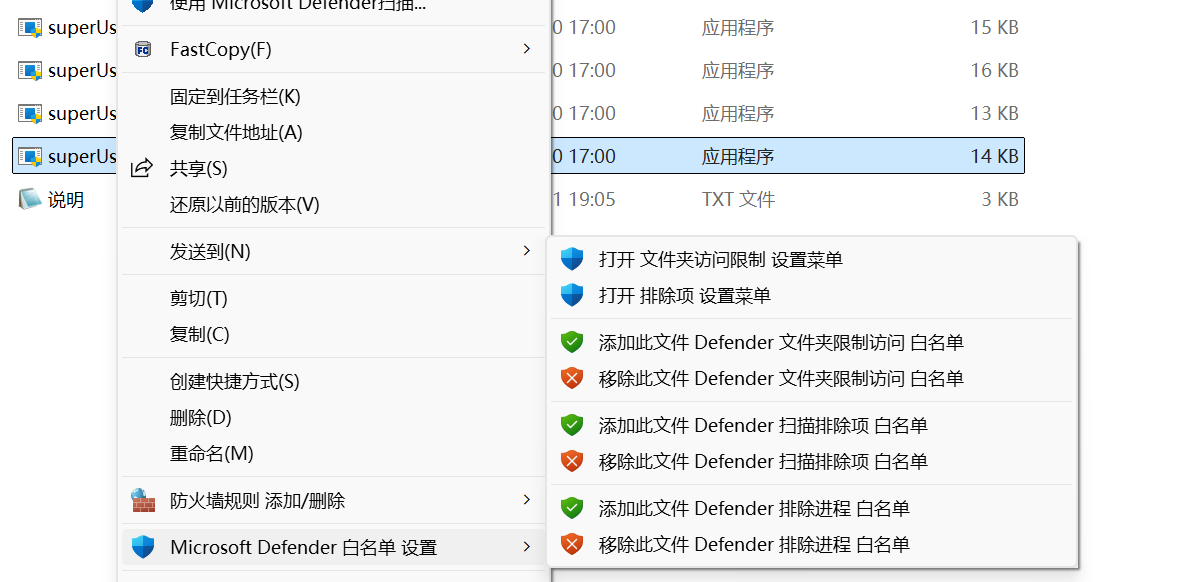
你如果用WD的话。用这个注册表吧。添加 访问限制白名单(防止有时候提示,比如访问我的文档,C盘相关目录才可能 出现。)
- Windows Registry Editor Version 5.00
- #右键 移除 defender 白名单设置
- [-HKEY_CLASSES_ROOT\*\shell\DefenderExclusion]
- [-HKEY_CLASSES_ROOT\Directory\shell\DefenderExclusion]
- [-HKEY_CLASSES_ROOT\Directory\background\shell\DefenderExclusion]
- [-HKEY_CLASSES_ROOT\Drive\shell\DefenderExclusion]
- #右键 增加 defender 白名单设置
- [HKEY_CLASSES_ROOT\*\shell\DefenderExclusion]
- "MUIVerb"="Microsoft Defender 白名单 设置"
- "Icon"="%ProgramFiles%\\\\Windows Defender\\\\EppManifest.dll,-101"
- "SubCommands"=""
- "Position"="Bottom"
- "SeparatorBefore"=""
- "SeparatorAfter"=""
- [HKEY_CLASSES_ROOT\*\shell\DefenderExclusion\Shell]
- [HKEY_CLASSES_ROOT\*\shell\DefenderExclusion\Shell\DE001]
- "MUIVerb"="打开 文件夹访问限制 设置菜单"
- "icon"="%ProgramFiles%\\\\Windows Defender\\\\EppManifest.dll,-101"
- [HKEY_CLASSES_ROOT\*\shell\DefenderExclusion\Shell\DE001\command]
- @="explorer windowsdefender://allowappthroughfolder"
- [HKEY_CLASSES_ROOT\*\shell\DefenderExclusion\Shell\DE002]
- "MUIVerb"="打开 排除项 设置菜单"
- "icon"="%ProgramFiles%\\\\Windows Defender\\\\EppManifest.dll,-101"
- [HKEY_CLASSES_ROOT\*\shell\DefenderExclusion\Shell\DE002\command]
- @="explorer windowsdefender://exclusions"
- [HKEY_CLASSES_ROOT\*\shell\DefenderExclusion\Shell\DE003]
- "MUIVerb"="添加此文件 Defender 文件夹限制访问 白名单"
- "Icon"="imageres.dll,101"
- "CommandFlags"=dword:00000020
- [HKEY_CLASSES_ROOT\*\shell\DefenderExclusion\Shell\DE003\command]
- @="powershell.exe -Command Start-Process PowerShell -ArgumentList \\\"Add-MpPreference -ControlledFolderAccessAllowedApplications '%V'; Write-Host 文件 \"%V\" \"已添加文件夹限制访问白名单\" -ForegroundColor Green; Write-Host \"按任意键退出...\" -ForegroundColor Yellow; `$null = [Console]::ReadKey(`$true); exit\\\" -verb RunAs"
- [HKEY_CLASSES_ROOT\*\shell\DefenderExclusion\Shell\DE004]
- "MUIVerb"="移除此文件 Defender 文件夹限制访问 白名单"
- "Icon"="imageres.dll,100"
- [HKEY_CLASSES_ROOT\*\shell\DefenderExclusion\Shell\DE004\command]
- @="powershell.exe -Command Start-Process PowerShell -ArgumentList \\\"Remove-MpPreference -ControlledFolderAccessAllowedApplications '%V'; Write-Host 文件 \"%V\" \"已移除文件夹限制访问白名单\" -ForegroundColor Green; Write-Host \"按任意键退出...\" -ForegroundColor Yellow; `$null = [Console]::ReadKey(`$true); exit\\\" -verb RunAs"
- [HKEY_CLASSES_ROOT\*\shell\DefenderExclusion\Shell\DE005]
- "MUIVerb"="添加此文件 Defender 扫描排除项 白名单"
- "CommandFlags"=dword:00000020
- "Icon"="imageres.dll,101"
- [HKEY_CLASSES_ROOT\*\shell\DefenderExclusion\Shell\DE005\command]
- @="powershell.exe -Command Start-Process PowerShell -ArgumentList \\\"Add-MpPreference -ExclusionPath '%V'; Write-Host 文件 \"%V\" \"已添加扫描排除项白名单\" -ForegroundColor Green; Write-Host \"按任意键退出...\" -ForegroundColor Yellow; `$null = [Console]::ReadKey(`$true); exit\\\" -verb RunAs"
- [HKEY_CLASSES_ROOT\*\shell\DefenderExclusion\Shell\DE006]
- "MUIVerb"="移除此文件 Defender 扫描排除项 白名单"
- "Icon"="imageres.dll,100"
- [HKEY_CLASSES_ROOT\*\shell\DefenderExclusion\Shell\DE006\command]
- @="powershell.exe -Command Start-Process PowerShell -ArgumentList \\\"Remove-MpPreference -ExclusionPath '%V'; Write-Host 文件 \"%V\" \"已移除文件夹限制访问白名单\" -ForegroundColor Green; Write-Host \"按任意键退出...\" -ForegroundColor Yellow; `$null = [Console]::ReadKey(`$true); exit\\\" -verb RunAs"
- [HKEY_CLASSES_ROOT\*\shell\DefenderExclusion\Shell\DE007]
- "CommandFlags"=dword:00000020
- "MUIVerb"="添加此文件 Defender 排除进程 白名单"
- "Icon"="imageres.dll,101"
- [HKEY_CLASSES_ROOT\*\shell\DefenderExclusion\Shell\DE007\command]
- @="powershell.exe -Command Start-Process PowerShell -ArgumentList \\\"Add-MpPreference -ExclusionProcess '%V'; Write-Host 文件 \"%V\" \"已添加进程排除白名单\" -ForegroundColor Green; Write-Host \"按任意键退出...\" -ForegroundColor Yellow; `$null = [Console]::ReadKey(`$true); exit\\\" -verb RunAs"
- [HKEY_CLASSES_ROOT\*\shell\DefenderExclusion\Shell\DE008]
- "MUIVerb"="移除此文件 Defender 排除进程 白名单"
- "Icon"="imageres.dll,100"
- [HKEY_CLASSES_ROOT\*\shell\DefenderExclusion\Shell\DE008\command]
- @="powershell.exe -Command Start-Process PowerShell -ArgumentList \\\"Remove-MpPreference -ExclusionProcess '%V'; Write-Host 文件 \"%V\" \"已移除进程排除白名单\" -ForegroundColor Green; Write-Host \"按任意键退出...\" -ForegroundColor Yellow; `$null = [Console]::ReadKey(`$true); exit\\\" -verb RunAs"
- [HKEY_CLASSES_ROOT\Directory\shell\DefenderExclusion]
- "MUIVerb"="Microsoft Defender 白名单 设置"
- "Icon"="%ProgramFiles%\\\\Windows Defender\\\\EppManifest.dll,-101"
- "SubCommands"=""
- "Position"="Bottom"
- "SeparatorBefore"=""
- "SeparatorAfter"=""
- [HKEY_CLASSES_ROOT\Directory\shell\DefenderExclusion\Shell\DE001]
- "MUIVerb"="打开 文件夹访问限制 设置菜单"
- "icon"="%ProgramFiles%\\\\Windows Defender\\\\EppManifest.dll,-101"
- [HKEY_CLASSES_ROOT\Directory\shell\DefenderExclusion\Shell\DE001\command]
- @="explorer windowsdefender://allowappthroughfolder"
- [HKEY_CLASSES_ROOT\Directory\shell\DefenderExclusion\Shell\DE002]
- "MUIVerb"="打开 排除项 设置菜单"
- "icon"="%ProgramFiles%\\\\Windows Defender\\\\EppManifest.dll,-101"
- [HKEY_CLASSES_ROOT\Directory\shell\DefenderExclusion\Shell\DE002\command]
- @="explorer windowsdefender://exclusions"
- [HKEY_CLASSES_ROOT\Directory\shell\DefenderExclusion\Shell\DE003]
- "Icon"="imageres.dll,101"
- "MUIVerb"="添加此文件夹 Defender 扫描排除项 白名单"
- "CommandFlags"=dword:00000020
- [HKEY_CLASSES_ROOT\Directory\shell\DefenderExclusion\Shell\DE003\command]
- @="powershell.exe -Command Start-Process PowerShell -ArgumentList \\\"Add-MpPreference -ExclusionPath '%V'; Write-Host 文件夹 \"%V\" \"已添加扫描排除项白名单\" -ForegroundColor Green; Write-Host \"按任意键退出...\" -ForegroundColor Yellow; `$null = [Console]::ReadKey(`$true); exit\\\" -verb RunAs"
- [HKEY_CLASSES_ROOT\Directory\shell\DefenderExclusion\Shell\DE004]
- "Icon"="imageres.dll,100"
- "MUIVerb"="移除此文件夹 Defender 扫描排除项 白名单"
- [HKEY_CLASSES_ROOT\Directory\shell\DefenderExclusion\Shell\DE004\command]
- @="powershell.exe -Command Start-Process PowerShell -ArgumentList \\\"Remove-MpPreference -ExclusionPath '%V'; Write-Host 文件夹 \"%V\" \"已移除扫描排除项白名单\" -ForegroundColor Green; Write-Host \"按任意键退出...\" -ForegroundColor Yellow; `$null = [Console]::ReadKey(`$true); exit\\\" -verb RunAs"
- [HKEY_CLASSES_ROOT\Directory\background\shell\DefenderExclusion]
- "MUIVerb"="Microsoft Defender 白名单 设置"
- "Icon"="%ProgramFiles%\\\\Windows Defender\\\\EppManifest.dll,-101"
- "SubCommands"=""
- "Position"="Bottom"
- "SeparatorBefore"=""
- "SeparatorAfter"=""
- [HKEY_CLASSES_ROOT\Directory\background\shell\DefenderExclusion\Shell\DE001]
- "MUIVerb"="打开 文件夹访问限制 设置菜单"
- "icon"="%ProgramFiles%\\\\Windows Defender\\\\EppManifest.dll,-101"
- [HKEY_CLASSES_ROOT\Directory\background\shell\DefenderExclusion\Shell\DE001\command]
- @="explorer windowsdefender://allowappthroughfolder"
- [HKEY_CLASSES_ROOT\Directory\background\shell\DefenderExclusion\Shell\DE002]
- "MUIVerb"="打开 排除项 设置菜单"
- "icon"="%ProgramFiles%\\\\Windows Defender\\\\EppManifest.dll,-101"
- [HKEY_CLASSES_ROOT\Directory\background\shell\DefenderExclusion\Shell\DE002\command]
- @="explorer windowsdefender://exclusions"
- [HKEY_CLASSES_ROOT\Directory\background\shell\DefenderExclusion\Shell\DE003]
- "Icon"="imageres.dll,101"
- "MUIVerb"="添加此文件夹 Defender 扫描排除项 白名单"
- "CommandFlags"=dword:00000020
- [HKEY_CLASSES_ROOT\Directory\background\shell\DefenderExclusion\Shell\DE003\command]
- @="powershell.exe -Command Start-Process PowerShell -ArgumentList \\\"Add-MpPreference -ExclusionPath '%V'; Write-Host 文件夹 \"%V\" \"已添加扫描排除项白名单\" -ForegroundColor Green; Write-Host \"按任意键退出...\" -ForegroundColor Yellow; `$null = [Console]::ReadKey(`$true); exit\\\" -verb RunAs"
- [HKEY_CLASSES_ROOT\Directory\background\shell\DefenderExclusion\Shell\DE004]
- "Icon"="imageres.dll,100"
- "MUIVerb"="移除此文件夹 Defender 扫描排除项 白名单"
- [HKEY_CLASSES_ROOT\Directory\background\shell\DefenderExclusion\Shell\DE004\command]
- @="powershell.exe -Command Start-Process PowerShell -ArgumentList \\\"Remove-MpPreference -ExclusionPath '%V'; Write-Host 文件夹 \"%V\" \"已移除扫描排除项白名单\" -ForegroundColor Green; Write-Host \"按任意键退出...\" -ForegroundColor Yellow; `$null = [Console]::ReadKey(`$true); exit\\\" -verb RunAs"
- [HKEY_CLASSES_ROOT\Drive\shell\DefenderExclusion]
- "MUIVerb"="Microsoft Defender 白名单 设置"
- "Icon"="%ProgramFiles%\\\\Windows Defender\\\\EppManifest.dll,-101"
- "SubCommands"=""
- "Position"="Bottom"
- "SeparatorBefore"=""
- "SeparatorAfter"=""
- [HKEY_CLASSES_ROOT\Drive\shell\DefenderExclusion\Shell\DE001]
- "MUIVerb"="打开 文件夹访问限制 设置菜单"
- "icon"="%ProgramFiles%\\\\Windows Defender\\\\EppManifest.dll,-101"
- [HKEY_CLASSES_ROOT\Drive\shell\DefenderExclusion\Shell\DE001\command]
- @="explorer windowsdefender://allowappthroughfolder"
- [HKEY_CLASSES_ROOT\Drive\shell\DefenderExclusion\Shell\DE002]
- "MUIVerb"="打开 排除项 设置菜单"
- "icon"="%ProgramFiles%\\\\Windows Defender\\\\EppManifest.dll,-101"
- [HKEY_CLASSES_ROOT\Drive\shell\DefenderExclusion\Shell\DE002\command]
- @="explorer windowsdefender://exclusions"
- [HKEY_CLASSES_ROOT\Drive\shell\DefenderExclusion\Shell\DE003]
- "Icon"="imageres.dll,101"
- "MUIVerb"="添加此驱动器 Defender 扫描排除项 白名单"
- "CommandFlags"=dword:00000020
- [HKEY_CLASSES_ROOT\Drive\shell\DefenderExclusion\Shell\DE003\command]
- @="PowerShell -windowstyle hidden -Command \"Start-Process cmd -ArgumentList '/s,/c,start PowerShell.exe Add-MpPreference -ExclusionPath \"\"%1\"\"; Write-Host 驱动器\"\"%1\"\" \\\"已添加扫描排除项白名单\\\" -ForegroundColor Green; Write-Host \\\"按任意键退出...\\\" -ForegroundColor Yellow; $null = [Console]::ReadKey($true); exit' -Verb RunAs\""
- [HKEY_CLASSES_ROOT\Drive\shell\DefenderExclusion\Shell\DE004]
- "Icon"="imageres.dll,100"
- "MUIVerb"="移除此驱动器 Defender 扫描排除项 白名单"
- [HKEY_CLASSES_ROOT\Drive\shell\DefenderExclusion\Shell\DE004\command]
- @="PowerShell -windowstyle hidden -Command \"Start-Process cmd -ArgumentList '/s,/c,start PowerShell.exe Remove-MpPreference -ExclusionPath \"\"%1\"\"; Write-Host 驱动器\"\"%1\"\" \\\"已移除扫描排除项白名单\\\" -ForegroundColor Green; Write-Host \\\"按任意键退出...\\\" -ForegroundColor Yellow; $null = [Console]::ReadKey($true); exit' -Verb RunAs\""
|
|

 楼主: qq8899399
 闽公网安备35020302032614号 )

 IP卡
IP卡 狗仔卡
狗仔卡
 显身卡
显身卡 发表于 2025-12-8 22:36:03